
In part one of this series, we covered the tasks and workflows fleets can automate. This includes vehicle readiness, EV charging, anomaly detection, and more. This article covers how to design the automations, what triggers them, and how KPIs should be treated as inputs rather than outputs.
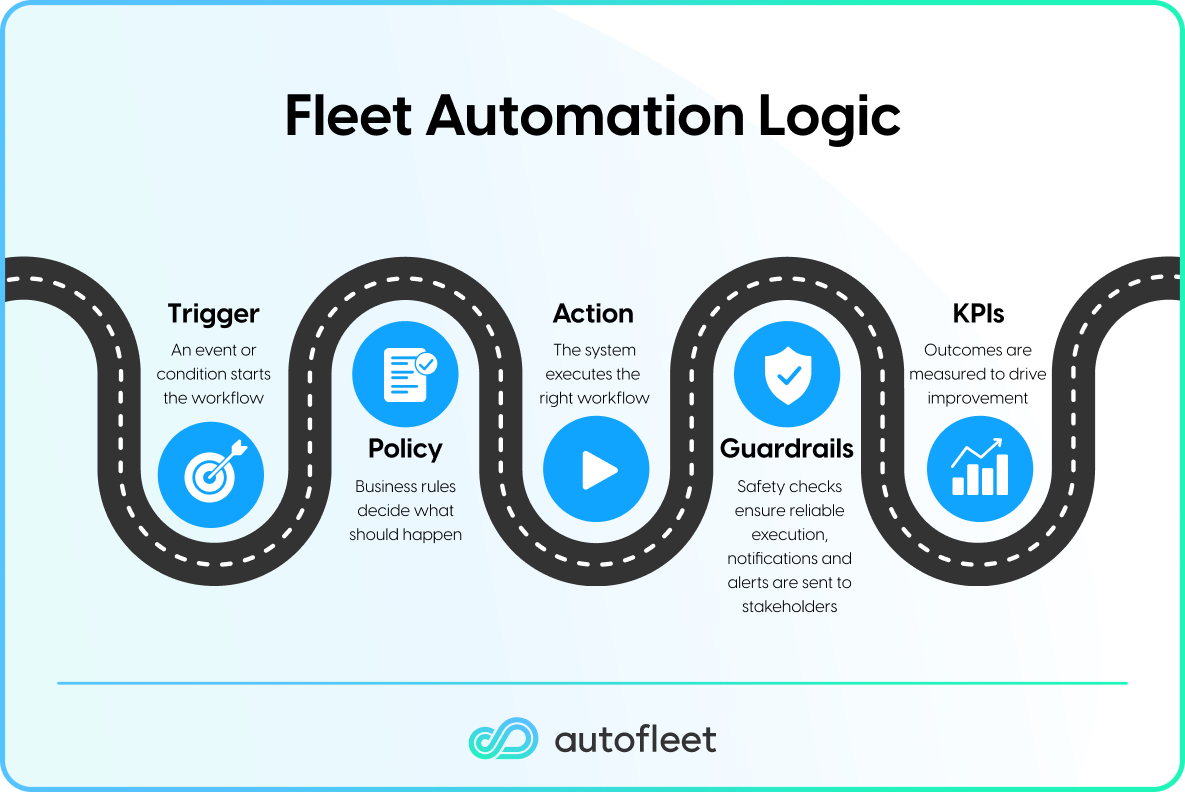
Every fleet management automation in Autofleet follows the same logic: Trigger → Policy → Action → Guardrail → KPI. Getting each layer right is what separates automations that run reliably from those that fire too often, too late, or for the wrong reasons.
Trigger-based Automations
When something changes, the window to act can often pass by the time a human notices. Whether that's an offline vehicle, a missed booking, or an EV battery dropping below a safe level, these movements can quickly impact the entire fleet.
Trigger-based automations close that gap. The system detects the signal and acts on granular conditions and policies without manual intervention. There are three trigger types:
Event-based
This automation fires when something changes. For example, a field agent reports that an installation is running long. The moment the report is submitted, the Autofleet Automation Engine assesses severity and sends the appropriate response. This could be to reassign future assignments to another technician, send an updated ETA to the client, schedule a future appointment, and alert the control center, all without human intervention. Another example is a manifest-based dispatch. As soon as a client emails the next day's ride requests, the automation downloads the file, passes it to the routing engine, and pushes optimized plans to drivers before the morning shift.
Time-based
This fires on a schedule at a set time, say a report generated every Tuesday at 3PM, just in time for a meeting, or at set intervals from key events, like several hours before a pickup, or if a vehicle hasn't moved for a set number of days.
State-based
When a vehicle or asset reaches a defined condition, such as an EV battery below a threshold or a missed inspection, the automation will trigger a new workflow. Preventative maintenance automation is one example. As a vehicle approaches a predefined odometer reading, the automated fleet management system progressively escalates task priority. If the threshold is met without the task being completed, the vehicle is blocked until the maintenance or servicing is completed.

Examples of trigger-based automations
These fleet task automations can also be chained together. A damage report that blocks a vehicle can simultaneously open a vendor task, notify the ops manager, and update the vehicle's status in the reservation system.
KPI-based Automations
Many fleets already have dashboards providing visibility into various KPIs. The real differentiator, however, is in powering automations based on these KPIs. Most fleet management tools treat KPIs as reporting outputs; numbers that tell you what happened after the fact. Autofleet's Automation Engine treats them as operational inputs: live thresholds that trigger workflows before a KPI has a chance to deteriorate.
Instead of a weekly review revealing that on-time performance has dropped, the system detects early indicators and then acts before the number moves. This might include ETA drift on a specific route or vendor response time creeping past its service-level agreement (SLA).
Using Autofleet's Automation Engine, you can set KPI thresholds or changes as the trigger. This typically follows this pattern: KPI → Trigger → Action → Expected Impact
Here are a few examples of KPIs you can use to automate your fleet activity.
Utilization
When a cluster of vehicles drops below a target threshold (for a set period of time), the system triggers a demand redistribution workflow. This ensures the vehicles are in the locations where they are most likely to be used.
Downtime and availability
When vehicle cleaning tasks backlog starts building up, the automated fleet management system can reassign tasks to available vendors and set task priorities. At the same time, it alerts the ops team before the queue becomes a fleet-wide problem.
SLA performance
Set a rolling 48-hour threshold on on-time performance. When a route drops below the target, the system re-optimizes on the fly to avoid further delays. For one food delivery provider, replacing manual job allocation with automated assignment logic cut dispatch time by 81%.
Productivity
This encompasses, for example, dispatch interventions per shift. This shows where humans are still handling what the fleet automation system should. High intervention rates signal that a threshold is set too conservatively or that a workflow hasn't been automated yet.
Examples of KPI-based automations
The teams running dozens of automations didn't start there. They picked the highest-cost manual workflow, defined the trigger, set the policy, measured the impact, and repeated. Every fleet automation that runs reliably creates capacity for the next one, and every exception log is a signal to tune the system further.
If you'd like to know more about the Autofleet Automation Engine, book a demo.


Table of сontents